Settings
所有配置都在这一屏。分四大类:主题 / 文件系统 / 动效 / 语言。每一项改完立刻生效,不用点”保存”。
一句话
主题切换(HSL 取色 + 条带色 + 装饰 + 背景层)+ 文件系统(user / root / 安全黑名单)+ 动效(5 个预设 + 震动时长)+ 中英双语,全部实时应用、AsyncStorage 持久化。
源码:src/screens/SettingsScreen.tsx(~580 行)+ src/contexts/SettingsContext.tsx。
实拍
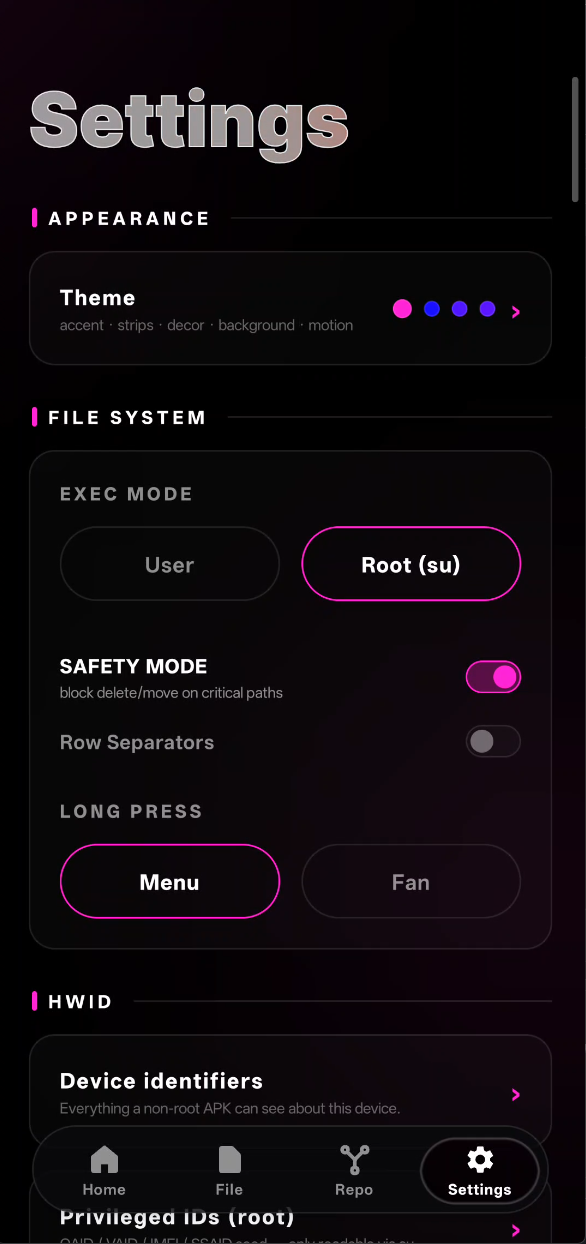
粉色小竖条 ▮ 是每个分区标题(APPEARANCE / FILE SYSTEM / HWID)的签名;EXEC MODE 的粉色描边按钮选中态(Root (su))就是全局主题色。
长这样
┌────────────────────────────────────────┐
│  Settings                              │
├────────────────────────────────────────┤
│                                        │
│  ┌─ THEME ──────────────────────┐     │
│  │                             ▸ │     │   ← 点进 Theme 子屏
│  └──────────────────────────────┘     │
│                                        │
│  ─── FILE SYSTEM ───                   │
│  ┌────────────────────────────┐       │
│  │ Execution mode             │       │
│  │   ( ) User                 │       │
│  │   (●) Root                 │       │
│  │                            │       │
│  │ Safety mode (blacklist)    │       │
│  │   [ /system  /vendor  ... ]│       │
│  └────────────────────────────┘       │
│                                        │
│  ─── MOTION ───                        │
│  ┌────────────────────────────┐       │
│  │ Animation preset           │       │
│  │   [Silk] [Liquid] [Bouncy] │       │
│  │   [Quick] [Snappy]         │       │
│  │                            │       │
│  │ Haptic duration  [ 30 ] ms│       │
│  └────────────────────────────┘       │
│                                        │
│  ─── LANGUAGE ───                      │
│  [ English ] [ 中文 ]                  │
│                                        │
└────────────────────────────────────────┘
Theme 点进去是一个子屏(本地 subScreen 状态,不走 navigator),更深入的调色选项。
Theme 子屏
┌────────────────────────────────────────┐
│ [ ← ]  Theme                           │
├────────────────────────────────────────┤
│                                        │
│  ─── ACCENT COLOR ───                  │
│  ┌─ 当前: #66CCFF ─────────────┐      │
│  │                          ▼ │       │  ← 点开展开 HSL picker
│  └────────────────────────────┘       │
│                                        │
│  ─── STRIP COLORS ───                  │
│  ┌─ 3 条色带 ─────────────────┐       │
│  │ Setting 卡:  [#........]▼ │       │
│  │ File 卡:     [#........]▼ │       │
│  │ Drivers 卡:  [#........]▼ │       │
│  └────────────────────────────┘       │
│                                        │
│  ─── STRIP DECOR ───                   │
│  ☑ rings   ☑ orbits   ☐ particles     │
│                                        │
│  ─── BACKGROUND ───                    │
│  ☑ glow   ☑ stars   ☐ snow   ☐ grid   │
│                                        │
└────────────────────────────────────────┘
主题引擎
所有 UI 颜色都从 useSettings().color / .stripColors[i] / .c.* 取。用户改一次 → SettingsContext state 变 → 所有订阅组件重新渲染 → 整个 App 瞬间换肤。
主 accent color
单个 HEX 值,例如 #66CCFF。影响:
- HoverText 轨道光色
- CeButton / Pill hover 边框
- Progress bar 填充
- 选中高亮
选色用 reanimated-color-picker(底层也是 Skia-friendly):
<ColorPicker value={color} onChange={onColorChange}>
  <HueSlider />
  <Panel1 />
</ColorPicker>拖就行——实时预览,整个 App 边调边变。
Strip colors(3 条)
每个 Home 快捷卡的右侧条带色。3 个独立 HEX。
Strip decorations(装饰)
卡片上额外的视觉元素开关,多选:
| 键 | 效果 |
|---|---|
rings | 卡片边上转动的光圈 |
orbits | 一个小光点绕着图标转 |
particles | 零星小点飘过 |
可以全关 → 卡片变极简。
Background effects(背景)
App 全局背景 4 层,多选:
| 键 | 效果 |
|---|---|
glow | 径向模糊光晕 blob(主色) |
stars | 星空点阵(白点 + 随机亮度) |
snow | 飘雪粒子(向下漂) |
grid | 网格线(极低 alpha) |
每层都 mount 一个 Skia Canvas 组件,关了的层不进 render tree——零开销。
FILE SYSTEM 部分
Execution mode
( ) User   ← 非 root,只走 android.system.Os.*
(●) Root   ← 走 su 会话池
切到 Root 时立刻触发 fs.ensureRoot()——如果还没授权会弹 SuperUser / KernelSU 的确认对话框。拒绝 → 回退到 user。
Safety mode(安全黑名单)
防止意外操作危险路径。启用后,对下列路径的写操作(delete / chmod / chown / move)会弹确认:
默认黑名单:
/system
/vendor
/boot
/odm
/product
/dev/block
用户可以自己加 / 删。
MOTION 部分
Animation preset
5 个预设,影响整个 App 的过渡感:
| preset | 曲线 | 时长 | 体感 |
|---|---|---|---|
| Silk | ease-out cubic | 400ms | 丝滑、商业 app |
| Liquid | 弹性 spring | 550ms | 果冻、流体感 |
| Bouncy | 强弹性 spring | 600ms | 俏皮、跳动 |
| Quick | ease-in-out | 200ms | 干脆、不等 |
| Snappy | 极短 spring | 150ms | 极客、专业工具 |
每个 preset 是一个 Reanimated config 对象:
export const ANIM_PRESETS = {
  silk:   { duration: 400, easing: Easing.out(Easing.cubic) },
  liquid: { damping: 12, stiffness: 100, mass: 1 },
  bouncy: { damping: 8,  stiffness: 120, mass: 1.3 },
  quick:  { duration: 200, easing: Easing.inOut(Easing.cubic) },
  snappy: { damping: 20, stiffness: 300, mass: 0.8 },
};
组件里用:
const preset = useSettings().animPreset;
withSpring(target, ANIM_PRESETS[preset]);
// 或
withTiming(target, ANIM_PRESETS[preset]);
Haptic duration
震动时长(ms)。触发 fan commit、重要按钮 press 这些动作时震一下。
- 默认 30ms
- 范围 0-100ms(0 = 关)
Vibration.vibrate(settings.vibrationMs);LANGUAGE 部分
单选:English / 中文
切换立刻生效——useSettings().t("key") 返回新语言的字符串,所有 <HoverText>、<Label>、按钮文字同一帧更新。
i18n 字典在 src/i18n.ts:
const strings = {
  en: { hero_title: 'SHADOW', hero_sub: 'NAV', ...},
  zh: { hero_title: '影子', hero_sub: '导航', ...},
};
扩展语言 = 加一个 key 就行——没有其他配置,不需要重编 App。
持久化
所有设置保存在 AsyncStorage:
// contexts/SettingsContext.tsx
useEffect(() => {
  AsyncStorage.setItem('@settings', JSON.stringify(settings));
}, [settings]);

// 启动时加载
useEffect(() => {
  AsyncStorage.getItem('@settings').then(raw => {
    if (raw) setSettings(JSON.parse(raw));
  });
}, []);
App 重启仍在。
Migration
schema 加字段了怎么办?读出 partial 对象,和 defaults merge:
const DEFAULT_SETTINGS = {
  color: '#66CCFF',
  lang: 'en',
  animPreset: 'silk',
  vibrationMs: 30,
  // ... new fields
};

const loaded = JSON.parse(raw);
setSettings({ ...DEFAULT_SETTINGS, ...loaded });
旧用户不会因为新字段没值报错——自动填默认。
子屏:HWID / PrivIds(WIP)
Settings 主屏底部还有两个入口点(图上没画,因为还未稳定):
- HWID —— 硬件 ID 轮换(IMEI / ANDROID_ID / Build.serial 等),为内核级 HWID 模块做前台配置
- PrivIds —— 私有 ID 管理(可能是 advertising ID、UUID 等)
都是 subScreen 路由(subScreen === 'hwid' | 'privids'),不走 navigation stack 以保持”一个 Settings 主屏就全了”的感觉。
设计哲学
这屏是 App 里最理性的一屏——没有扇形菜单、没有拖拽、没有手势仲裁。
- 每项 = 一个清单选项
- 改完立刻生效(所有 state 直连 context)
- SurfaceCard 把相关项包一块,
─── LABEL ───大标做分段
为什么 Theme 要单独是个子屏?因为调色是时间密集操作(HueSlider 拖 30 秒)——和短操作分开,不用每次都滚一大堆。
相关文件
src/screens/SettingsScreen.tsx— 主屏 + Theme 子屏src/screens/HwidScreen.tsx— HWID 子屏(WIP)src/screens/PrivIdsScreen.tsx— PrivIds 子屏(WIP)src/contexts/SettingsContext.tsx— 全局 state + AsyncStoragesrc/theme.ts— 常量表:ANIM_PRESETS / VIBRATION_PRESETS / EXEC_MODES / ALL_BG_EFFECTS / ALL_STRIP_DECOSsrc/i18n.ts— 中英字典src/components/CollapsibleCard.tsx— 展开/折叠卡(Theme 里包 HueSlider)src/components/ChoicePill.tsx— 单选 pill(exec mode / anim preset / lang)